Use pod-managed identities
Don't use fixed credentials within pods or container images, as they are at risk of exposure or abuse. Instead, use pod identities to automatically request access using Microsoft Entra ID.
To access other Azure resources, like Azure Cosmos DB, Key Vault, or Blob storage, the pod needs authentication credentials. You could define authentication credentials with the container image or inject them as a Kubernetes secret. Either way, you would need to manually create and assign them. Usually, these credentials are reused across pods and aren't regularly rotated.
With pod-managed identities (preview) for Azure resources, you automatically request access to services through Microsoft Entra ID. Pod-managed identities are currently in preview for AKS.
Microsoft Entra pod-managed identity (preview) supports two modes of operation:
- Standard mode: In this mode, the following 2 components are deployed to the AKS cluster:
- Managed Identity Controller(MIC): A Kubernetes controller that watches for changes to pods, AzureIdentity and AzureIdentityBinding through the Kubernetes API Server. When it detects a relevant change, the MIC adds or deletes AzureAssignedIdentity as needed. Specifically, when a pod is scheduled, the MIC assigns the managed identity on Azure to the underlying virtual machine scale set used by the node pool during the creation phase. When all pods using the identity are deleted, it removes the identity from the virtual machine scale set of the node pool, unless the same managed identity is used by other pods. The MIC takes similar actions when AzureIdentity or AzureIdentityBinding are created or deleted.
- Node Managed Identity (NMI): is a pod that runs as a DaemonSet on each node in the AKS cluster. NMI intercepts security token requests to the Azure Instance Metadata Service on each node. It redirects requests to itself and validates if the pod has access to the identity it's requesting a token for, and fetch the token from the Microsoft Entra tenant on behalf of the application.
- Managed Identity Controller(MIC): A Kubernetes controller that watches for changes to pods, AzureIdentity and AzureIdentityBinding through the Kubernetes API Server. When it detects a relevant change, the MIC adds or deletes AzureAssignedIdentity as needed. Specifically, when a pod is scheduled, the MIC assigns the managed identity on Azure to the underlying virtual machine scale set used by the node pool during the creation phase. When all pods using the identity are deleted, it removes the identity from the virtual machine scale set of the node pool, unless the same managed identity is used by other pods. The MIC takes similar actions when AzureIdentity or AzureIdentityBinding are created or deleted.
- Managed mode: In this mode, there's only NMI. The identity needs to be manually assigned and managed by the user. In this mode, when you use the az aks pod-identity add command to add a pod identity to an Azure Kubernetes Service (AKS) cluster, it creates the AzureIdentity and AzureIdentityBinding in the namespace specified by the --namespace parameter, while the AKS resource provider assigns the managed identity specified by the --identity-resource-id parameter to virtual machine scale set of each node pool in the AKS cluster.
The managed mode provides the following advantages over the standard:
- Identity assignment on the virtual machine scale set of a node pool can take up 40-60 seconds. With cronjobs or applications that require access to the identity and can't tolerate the assignment delay, it's best to use managed mode as the identity is pre-assigned to the virtual machine scale set of the node pool. Either manually or using the az aks pod-identity add command.
- In standard mode, MIC requires write permissions on the virtual machine scale set used by the AKS cluster and Managed Identity Operator permission on the user-assigned managed identities. When running in managed mode, since there's no MIC, the role assignments aren't required.
Instead of manually defining credentials for pods, pod-managed identities request an access token in real time, using it to access only their assigned resources. In AKS, there are two components that handle the operations to allow pods to use managed identities:
- The Node Management Identity (NMI) server is a pod that runs as a DaemonSet on each node in the AKS cluster. The NMI server listens for pod requests to Azure services.
- The Azure Resource Provider queries the Kubernetes API server and checks for an Azure identity mapping that corresponds to a pod.
When pods request a security token from Microsoft Entra ID to access to an Azure resource, network rules redirect the traffic to the NMI server.
The NMI server:
- Identifies pods requesting access to Azure resources based on their remote address.
- Queries the Azure Resource Provider.
The Azure Resource Provider checks for Azure identity mappings in the AKS cluster.
The NMI server requests an access token from Microsoft Entra ID based on the pod's identity mapping.
Microsoft Entra ID provides access to the NMI server, which is returned to the pod.
- This access token can be used by the pod to then request access to resources in Azure.
In the following example, a developer creates a pod that uses a managed identity to request access to Azure SQL Database:
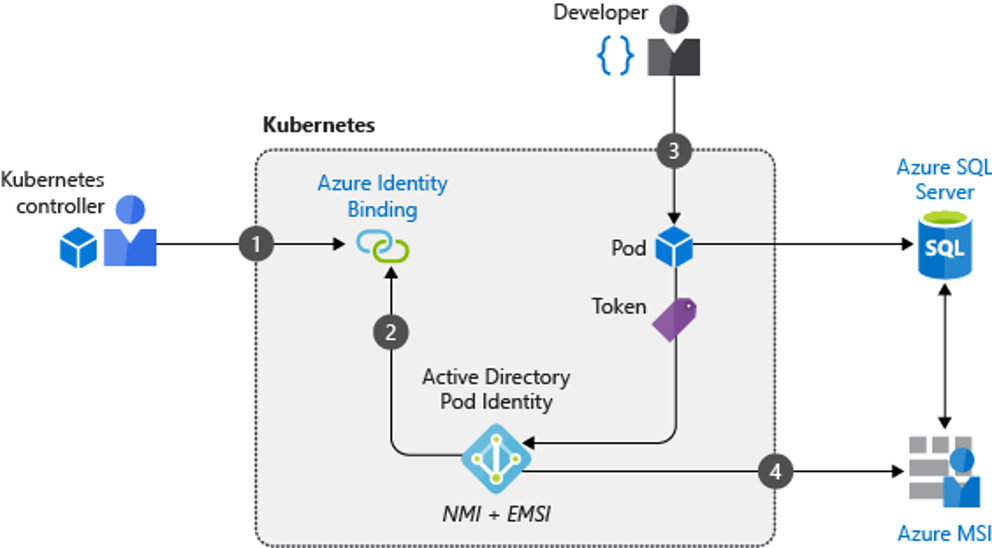
- Cluster operator creates a service account to map identities when pods request access to resources.
- The NMI server is deployed to relay any pod requests, along with the Azure Resource Provider, for access tokens to Microsoft Entra ID.
- A developer deploys a pod with a managed identity that requests an access token through the NMI server.
- The token is returned to the pod and used to access Azure SQL Database
Comments
Post a Comment